Top 5 Tools for Effective Content Repurposing
A review of must-have tools that make repurposing content a breeze for marketers.

The 5 Best Content Repurposing Tools for Marketers in 2025
You just spent hours creating the perfect blog post. Now you're staring at seven different social media platforms wondering how you'll promote it everywhere without losing your mind. The content hamster wheel is real, and it leaves marketers exhausted from constantly creating new material from scratch just to feed the algorithm. The secret to working smarter? Content repurposing tools.
The strategy has shifted from "create more content" to "create once and distribute everywhere." For lean teams, the golden standard is the 5-to-1 rule: take one core piece of long-form content and turn it into at least five different, platform-specific assets. Let's explore the best content repurposing tools available to help you maximize reach, save time, and boost ROI without burning out.
Why Content Repurposing Is Your Secret Weapon
Most marketing teams manage six to eight channels simultaneously. Manual repurposing quickly becomes the bottleneck. You need to get more mileage from every piece of content you create.
Repurposing provides real SEO advantages. When you update old blog posts and distribute fresh insights across different channels, you signal both relevance and expertise to search engines. You also reach entirely new audiences. Different people consume content differently. Some want quick, entertaining video. Others prefer detailed, analytical threads.
The "Zero-Visit-Visibility" trend means AI overviews now answer search questions directly on the results page without users clicking anything. Multi-format repurposed content gets prioritized by these AI search engines. When you offer video clips, text summaries, and visual infographics all stemming from the same core topic, you increase your chances of being cited as the definitive source.
Pairing human creativity with AI collaboration creates a sustainable workflow. You maximize your existing content library rather than constantly chasing the next big idea.
What Makes a Great Content Repurposing Tool?

A professional marketer reviewing a content distribution schedule across multiple social platforms
We set strict criteria for evaluating the tools on this list. A truly great content repurposing tool must offer seamless cross-platform adaptation. It needs to take a single asset and format it perfectly for TikTok, LinkedIn, or Instagram without manual tweaking.
It should provide strong workflow integration. Marketers need a centralized hub for storing, organizing, and scheduling all these new assets. Brand voice consistency is non-negotiable. If a tool uses AI to rewrite your content, that AI must maintain your unique tone across all formats so you don't sound like a generic robot.
We looked closely at analytics and performance feedback. Data-driven insights tell you exactly what's working and what needs adjustment. We prioritized massive time savings. Automation features that eliminate repetitive copying, pasting, and resizing tasks matter most.
The Top 5 Content Repurposing Tools for Marketers
We tested dozens of platforms and narrowed the field to these five must-haves. Each tool excels in a specific area of the content repurposing ecosystem.
Repostra.app
Repostra.app acts as your centralized command center for social media reposting and workflow management. This platform is the ultimate all-in-one social workflow solution. It's built for marketers managing multiple accounts who need streamlined cross-platform scheduling.
The tool offers powerful workflow-driven reposting capabilities. It allows you to build a content library organized by custom folders and tags. Don't confuse this with generic regram apps meant for casual influencers. Repostra.app is built specifically for professional marketers who need reliable, time-saving automation for serious content distribution.
Think of the marketer who creates a comprehensive company blog post. They need to share it across LinkedIn, Twitter, Facebook, and Instagram with platform-specific adaptations. Repostra.app makes this complex routing seamless. You can set up workflows that automatically queue variations of your post for different days and different platforms.
Pricing varies based on team size, so check their website for current tiers. Our biggest tip? Use their tagging system to group your evergreen content by topic. This makes it easy to pull up older, high-performing posts and cycle them back into your active schedule months later.
Opus Clip
Opus Clip delivers AI-powered video editing that extracts the most engaging moments from your long-form content. This tool dominates the long-form video to short-form clips category. It's perfect for content creators with YouTube videos, long webinars, or podcasts who want to generate TikToks, Reels, and Shorts at scale.
Key features include AI identification of highlight moments. The system scans your video for emotional spikes, keyword density, and visual changes to find the best hooks. It generates automatic subtitles that rival professional editing. It handles aspect ratio adjustments for different platforms automatically, keeping the active speaker centered in vertical formats. You also get access to a template library for quick, branded editing.
Imagine transforming a 45-minute technical webinar into ten shareable clips for social media. What used to take a video editor hours now takes minutes. Opus Clip integrates easily with popular video hosting platforms to make the initial import process effortless.
Jasper
Jasper excels at converting long-form written content into engaging social media posts, threads, and short snippets. Bloggers and content marketers who work with text-based content will find this platform indispensable.
The platform features AI summarization for complex, lengthy articles. It automatically generates engaging social media captions and allows for deep brand voice customization through its Brand Voice feature. You get multiple format outputs tailored for the specific network you're targeting.
You can upload a 2,000-word thought leadership blog post and ask Jasper to turn it into fifteen ready-to-post social updates in one sitting. The brand consistency feature ensures the AI sounds exactly like your brand, maintaining your unique vocabulary and tone. It automatically optimizes the format for each platform. Your LinkedIn output will sound professional and insightful, while your Twitter output will be punchy and conversational.
Claude
Claude serves as an AI research and summarization tool that helps you digest competitor content and long-form materials at lightning speed. Content strategists use it to stay informed and spin up new angles for thought leadership content.
It offers document summarization capabilities and synthesizes research from multiple complex sources simultaneously. You can extract insights for fresh content ideas while managing citations to maintain credibility.
Picture analyzing five dense competitor whitepapers. Claude can review them all in minutes and help you generate a unique perspective for your next blog post. This provides immense strategic value. You're not just repurposing your own existing content. You're synthesizing broad industry knowledge into digestible formats. The time saved is incredible, accelerating the research phase from days to hours.
Buffer
Buffer manages your content calendar and distribution across all marketing channels. Teams coordinating repurposed content across multiple platforms with different posting schedules will love this multi-platform scheduling solution.
You get a visual content calendar and robust multi-channel support for all major social platforms. The team collaboration features streamline the entire approval process from draft to publication. A clean analytics dashboard shows exactly how your repurposed content performs across different channels over time.
You could schedule a full month of repurposed content across eight platforms in one afternoon. The collaboration features keep your entire team aligned without messy email threads. The analytics help you identify exactly which repurposed formats resonate best with your audience so you can double down on what works.
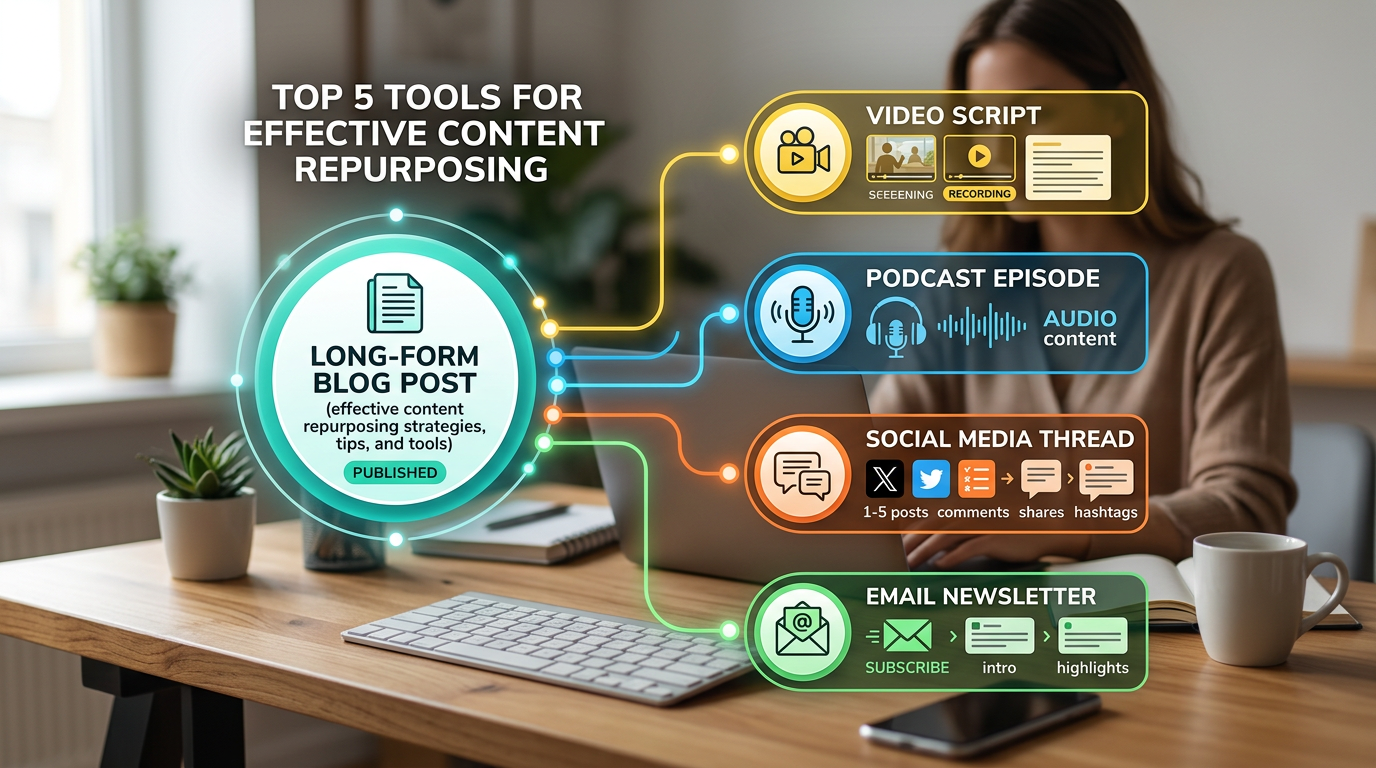
Infographic demonstrating the 5-to-1 content repurposing strategy
Best Practices for Repurposing Content
The critical distinction? You must repurpose with purpose. Adapt your content, don't just copy and paste it everywhere. Each social platform carries different audience expectations based on platform psychology.
LinkedIn audiences look for professional insights, career growth, and thought leadership. TikTok users expect entertainment value, authenticity, and extremely quick visual hooks. Instagram thrives on visual storytelling, aesthetics, and lifestyle context. Twitter audiences engage best with conversational, fast-paced, news-worthy angles.
The adaptation formula is simple. Combine your core message with the specific platform psychology to achieve effective repurposing. Always choose quality over quantity. It's better to repurpose well for three platforms than poorly for ten.
How do you know which piece to start with? Audit your existing high-performing evergreen content first. Identify your pillar content that deserves maximum repurposing effort. If a blog post drove massive traffic last year, it's a prime candidate for a video series this year.
Timing your strategy matters. Don't flood all your channels with the exact same message at the exact same moment. Stagger your distribution over weeks or months for maximum reach. Measure and iterate constantly. Use your analytics dashboards to refine which formats work best for your unique audience.
Let's look at a practical example. One core blog post about industry trends becomes a LinkedIn article packed with professional insights. It becomes a Twitter thread highlighting the top three takeaways. It transforms into an Instagram carousel featuring visual statistics from the article. You shoot a quick TikTok video covering the main tips. It serves as the foundation for an email newsletter with expanded commentary for your subscribers.
Getting Started: Your Content Repurposing Action Plan
Your first step? Audit your existing content library for evergreen, high-performing pieces. Look for articles, videos, or podcasts that still hold relevance.
Step two is choosing one or two tools from the list above based on your primary content format. If you make videos, start with Opus Clip. If you write articles, start with Jasper or Repostra.app.
Step three involves mapping out your exact repurposing workflow. Decide which platforms you'll target and at what frequency you want to post.
Step four is creating a dedicated content calendar specifically for your newly repurposed assets. Treat these assets with the same respect you give to brand new content.
Step five requires you to test, measure, and refine based on performance data. Set realistic expectations early on. Start by repurposing just one major piece of content per week. Get team alignment and buy-in from stakeholders on this new strategy.
For a quick win this week? Pick one high-performing blog post from last quarter and repurpose it using just one of these tools. Even small, deliberate steps toward a structured repurposing workflow will save you hours and drastically expand your reach.
Content repurposing tools are essential for sustainable, growth-focused marketing. They allow you to work smarter instead of harder. Remember the 5-to-1 rule as you plan your campaigns. Every major piece of content you create should spawn at least five additional assets.
It's time to break free from the exhausting content hamster wheel. Start today by choosing one tool and adapting one piece of existing content this week. The marketers who master repurposing now will dominate their niches in the coming years. Your best content deserves more than one brief moment in the spotlight. Give it the smart distribution it needs to truly impact your business.